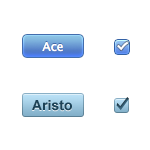
Web app theme showdown: Aristo and Ace
A recent call for a unified web app UI theme reminded me that there are two awesome web UI themes you can use right now. Both of the leading thick-client web frameworks recently released new themes that:
- Look great
- Are licensed as Creative Commons Attribution Share-Alike
- Come part of a slick framework or as separate assets
- Start with the letter A
- Are blue
They’re more similar than they are different, so which do you choose?
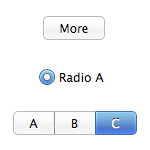
Ace
Framework: SproutCore
Designer: Cocoia
GitHub: Available as sprited images
New for: SproutCore 1.0
Lickable and saturated, SproutCore’s theme is clearly inspired by OS X’s Aqua. Although their “selected” controls are very bright, their normal look is appropriately plain. You can play with the controls using SproutCore’s sample controls demo.
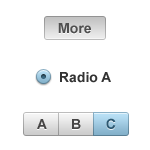
Aristo
Framework: Cappuccino
Designer: Sofa
GitHub: Available as PSD or a 3rd party CSS3 implementation
New for: Cappuccino 0.7
Cappuccino’s theme is more focused at looking great on Windows as well as OS X, which is clearly a win for web applications. Its more slate-like look will fit in better with “serious” apps, but doesn’t have the pop that SproutCore’s controls do. They’re available as a PSD file for download. Update: There is indeed an Aristo sample controls page.
What now?
Build a great web app! Consistent UI widgets have been a usability guideline for decades, but limited, ugly, or inconsistent widgets drove web designers to produce a new theme for every app. Next time you start one, whether you’re using the frameworks or stealing their themes, there’s no excuse for having a weak UI theme.
Aug 25 2009
10:21 pm
Full disclosure: SproutCore development is sponsored by Apple, where I use it on a daily basis. This review is totally unrelated to my job though – I’m not in Design or on the SproutCore team.
Aug 25 2009
10:31 pm
FYI – SproutCore has theme support too. Some folks have talked about providing Aristo as a them to SproutCore alongside Ace, which I think would be just dandy. :-)
Aug 26 2009
5:56 am
These toolkits are looking better and better, including behaviours and more. Thanks for the summary (I’ll have to consider for current secret project #28 and #42).
Aug 26 2009
7:44 am
Frack that, how about we just have standard CSS classes for certain widgets and widget components?
Then we could leave it up to the Client OS to drop in a client-side CSS for the page. Windows, OSX, Clearlooks…
But that’d probably fail, eh? You’re likely thinking the same issues I’m thinking of – that the site designers won’t be able to account for the idiosyncrasies across every client look and feel. They’ll likely prefer to enforce their own, and once given that capacity they’ll want to brand it.
Like you’ll ever see a Coke site use blue widgets, or Google default to a purple color scheme.
Aug 26 2009
8:46 am
No, you make a good point. A lot of the drive for custom widgets has been due to the lack of native widgets in the browsers. There are no sliders, tab controls, etc. defined in HTML4. HTML5 should improve this a lot, and maybe we’ll be able to just use native controls in a lot of cases.
Aug 26 2009
10:26 am
Please don’t style form controls!
I want style of my browser/operating system. It is uniform for _me_.
Aug 26 2009
10:36 am
kl, I agree! Unfortunately that works for form controls, but when you have a thick-client web app with sliders, date pickers, toolbars, tab strips, context menus, and progress bars, there’s no way to do any of that in HTML.
Pingback Ajaxian » Aristo and Ace; Good looking and open?
Aug 27 2009
3:48 am
[...] Pike has posted a comparison of Aristo with the new Ace look and feel that SproutCore recently added. It is great to see great [...]
Aug 27 2009
5:19 am
One thing I’ve noticed is that Ace loads so much faster than Aristo and this is because Ace uses one single sprites image for all of their widgets while Aristo uses a bunch of images.
This makes Ace a much better implementation because it removes flicker from the widgets when changing states.
Aug 27 2009
7:47 am
I’m not sure unstyled forms work in all contexts, as not even rich desktop applications use the same styles of controls uniformly: the choice is based on what works well and looks reasonable in a given application. Limiting the choice to stock forms and form controls would disallow improvements and styles that make the experience better.
Aug 27 2009
10:02 am
Also take a look at http://themeroller.com, our very own approach at theming. It will not only generate a heavily customized theme based on your needs, but it goes way beyond ‘just’ styling jQuery UI widgets. People are bundling whole applications with the CSS Framework, as well as styling the form controls.
Aug 27 2009
10:14 am
Sprited images do make a huge impact, although they are a pain to make and maintain. I’d say Cappuccino needs to implement them to consider themselves 1.0.
Aug 27 2009
11:01 am
Allen (and Cappuccino team for that matter), I’m using SmartSprites (http://csssprites.org/) to maintain a very complex set of theme images in my attempt to make web toolkits look nicer (http://vaadin.com).
SmartSprites is a Java command line sprite generator, which works quite well for my needs. It doesn’t pack the sprites in the smallest possible organization, but at least I can have my images easily (and automatically) bundled together.
With SmartSprites, enabling sprites isn’t any harder than regular CSS theming. Highly recommended.
Pingback The Ashes » Blog Archive » Aristo and Ace; Good looking and open?
Aug 27 2009
11:24 am
[...] Pike has posted a comparison of Aristo with the new Ace look and feel that SproutCore recently added. It is great to see great [...]
Aug 27 2009
11:53 am
But will they work with IE6?!?
Aug 27 2009
11:53 am
Allen, you need to tweak your theme to better control text overflow. :)
Aug 27 2009
12:08 pm
Charles (who is the creator of SproutCore FYI): That makes a lot of sense, and would probably serve as a good example on how to create a SproutCore theme.
Paul (who is the creator of JQuery UI FYI): ThemeRoller is slick, especially for how it can be used on its own outside of JQuery.
Steve: Fixed, sorry about that.
Mar 29 2010
4:07 pm
Cappuccino’s latest version actually comes with support for a new and better image spriting technique.
Rather than require manually building sprite files, hand editing CSS, or manually annotating images with restrictions, it uses Data URL and/or MHTML support found in every major browser. Just by running the standard build tools, all of the resources in your app will be sprited, and the correct sprited resource is determined at runtime using browser feature detection.
Mar 29 2010
4:13 pm
Ross: Anybody who’s spent time manually maintaining sprites will understand how great that feature is. It’s the kind of feature that shows why all web apps need build tools, even the ones written in JavaScript.