Update, July 2026: Added a postscript about how the rise of agentic coding has made these dynamics even stronger, on the heels of the ChatGPT app going Electron.
AgileBits recently caused a stir with their announcement that they’ve rewritten 1Password 8 as a cross-platform Electron app, replacing their well-loved native Mac app. The takes came hot and fast. Like many developers, I love and appreciate a well-crafted native UI, and I was once skeptical of the trend towards cross-platform app UIs.
The discourse around cross-platform app technologies has traditionally revolved around a simple idea: “cross-platform development is cheaper, while native development leads to better apps.”

And this is kinda true. Like, it’s true enough for a hand-wavy explanation of why cross-platform tools are popular.
But this mental model is so oversimplified that it obscures why the latest large, profitable company has gone down this path. Each time a cross-platform app has found itself in the crosshairs of the internet, I hear a variant of this question: “What is it about enterprise companies that leads so many of them to abandon native apps, when they could surely afford to develop one app for each platform?”
Well excellent question, synthetic rhetorical person!
In practice, the tradeoff is about much more than “cheap vs. good”. Unintuitively, sometimes native tech can actually be the cheapest way to achieve a certain goal – and sometimes cross-platform technologies actually lead to better products, even for very well-funded companies.
So what is a useful way to think about the tradeoff?
Over the last decade I’ve talked to people at hundreds of companies about how they’re developing and supporting apps, helping teams evaluate, plan, and execute native and cross-platform app work. While there are a lot of factors that go into this technology decision, there’s one that is consistently underestimated.
The Primary Tradeoff
At the highest level, cross-platform UI technologies prioritize coordinated featurefulness over polished simplicity.

Imagine the steel-man case for cross-platform UI: a complex enterprise app used by only a few thousand internal employees. They’re required to use the thing for work, and they need to be trained on it, but does it need to delight them? It does not. “Delight” is near the bottom of the priority list, between “cool soundtrack” and “joystick support”. The features just need to work, consistently – and cost-effectively – across platforms.
Given that, enterprisey companies love cross-platform tools. Enterprise buyers love feature checklists, and so “questionable UX” and “enterprise software” are strongly correlated. A classic criticism of cross-platform tools is that they often get you to 75% quality quickly, but the remaining 25% gets increasingly difficult. But if 75% quality is as far as you need to go, then I guess you’ve successfully fulfilled your fixed-bid contract.
Naturally then, internal enterprise apps converged long ago on cross-platform UIs – mostly web-based, mostly terrible. It’s a match made in heaven.
Where things get interesting is when you look at customer-facing software. Products where the experience is a big contributor to success or failure. Where the higher “UX ceiling” of platform-specific UI code can help retain paying users.
It seems, conceptually, that a big company willing to spend big money to build really nice native Mac and Windows apps would be in a position to outcompete the Electron-based Slacks, Figmas, and Spotifys of the world. Right? So why isn’t that happening?
The Quadratic Cost of Coordination
On a small product team, keeping a couple native apps consistent with one another isn’t hard.
Steamclock has built and iterated dozens of nice native apps with teams of 3 to 6 people – and kept iOS and Android products in sync with one another and their siblings on the web with little difficulty. At this scale, the UX and simplicity wins of native tooling can be a huge win.
However, consistency starts to become a problem as your product and organization grow. When you’re rapidly hiring, rapidly adding client features, and including support for a third, fourth, and fifth platform, things start to get dicey. 1Password’s Michael Fey touched on this in his excellent post about the development of 1Password 8:
Inconsistencies both small and large had crept into our apps over time. From small things like password strength being different between platforms to larger things like differences in search results and entire missing features.
This matters because as the number of feature, design, and bug variations between your platforms grows, coordinating clear conversations about your product gets harder.
- When is this feature rolling out on Mac?
- Is this support doc valid for web users?
- Wait, what platform was that big sales lead on?
At first this can be mitigated by throwing money at the sales and support teams, but as the inconsistencies accumulate, you hit a more dangerous problem: the product teams start to struggle to reason about their own product. You end up with siloed platform teams that aren’t on the same page.
Product conversations slow down, wires get crossed, and details get neglected.
Some companies avoid this fate by keeping their client apps lean. If you can stay disciplined in keeping your product simple, your platforms few, and your teams small, keeping everybody in sync can be workable. A critical tactic here is keeping as much complexity as possible server-side, working to keep your client apps as “dumb” as possible so you’re not simultaneously iterating a horde of logic across many different clients.
But if your team size and product complexity do approach Scale™, laden with giant teams and reams of features across a half-dozen platforms, the inconsistencies will get out of hand.
- A critical customer is angry because sales told them a feature works, but it only works on the platform sales checked.
- Somebody is dunking on us on Twitter because our docs are wrong, so a product manager dug into it – but it turns out they’re only wrong for Android.
- We can’t test a new improvement because it needs to be on all platforms at once, and those dinguses on the Windows team are 6 weeks behind.
- A terminology gap between the iOS and Android product teams led to a nasty bug being live on iOS for 5 weeks, when the Android team had already pushed a trivial fix.
Things get messy.
So at a certain size of product org, you get crackdowns on consistency and coordination. Product managers mandate more process to keep the platform codebases in sync. More time is spent on procedure, docs, and formality. Feature quality goes up, but feature progress gets slower. The product becomes easier to communicate about since it’s more consistent, but… actually it’s not changing very much anymore at all?
Now you’re keeping a half-dozen featureful codebases consistent, but at a brutal cost. Hiring more engineers might help slightly, but the super-linear nature of coordination overhead means the additional product velocity per new hire can get disturbingly low.
Slow and ineffective loses the race
Slow is a dangerous place for a product company to be. Slow product teams get outcompeted by fast ones.
We complain about how Figma and Slack don’t feel native, but why are most of us using Figma and Slack? We’re using them because they outbuilt and outcompeted their native competitors. There are many things that could improve in these products, but they’re the best tools yet built for their purposes.
Coordination overhead at scale is most often the deciding factor between cross-platform and native tools.
Yes, native UI is well suited to creating great user interfaces. But at a certain size and speed of product team, across a sufficient number of different client codebases, the systemic costs of coordinating feature development across the platforms will themselves undermine the user experience.
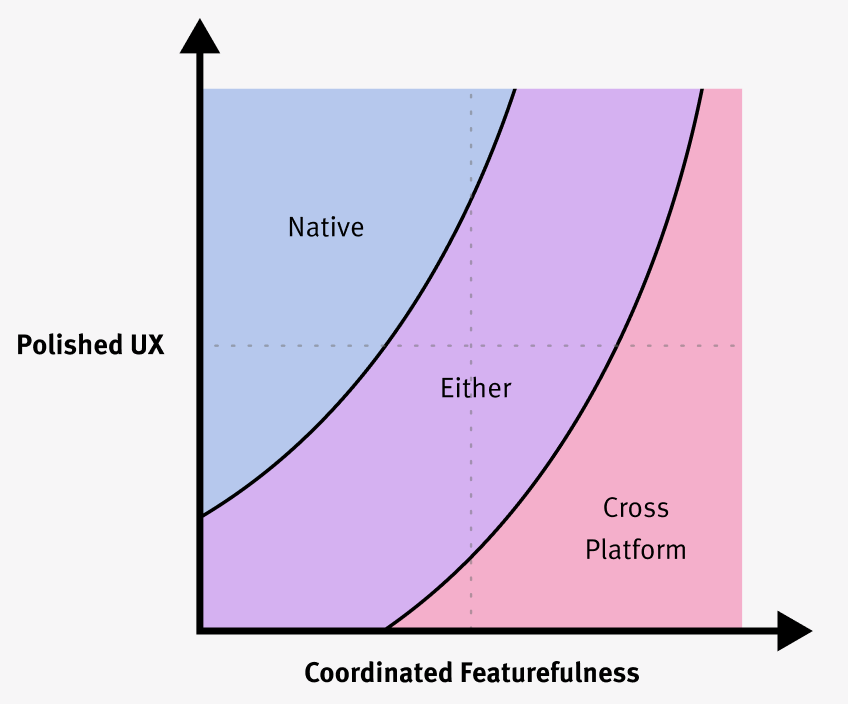 So instead of a straightforward “good vs. cheap” tradeoff, we get a non-linear one: the teams trying to coordinate the most feature work across the most platforms feel an incredible gravity towards cross-platform tools – even if a high priority on UX would predispose them to building native clients.
On mobile platforms, where teams are often more disciplined about features and more focused on UX polish, the tradeoff is a bit different and teams should more often go native than they do on desktop.
And to be sure, there is more than one way to use cross-platform technology to reduce the drag of coordination.
As controversial as 1Password’s move to Electron for UI was, their decision to move their apps to a shared Rust library was well received. Fascinatingly, in recent years teams like Dropbox and Slack have written about moving away from having a cross-platform core library powering their mobile apps – both teams are now fully native on iOS and Android. In a similar way, there always seem to be two lines of app teams, one announcing that they’ve moved towards React Native, and another announcing they’ve migrated away from it – a topic well deserving of its own post.
In the end, the best we can do is be mindful of what problems these technologies solve well. We watch them evolve, learn from people who are using them, and take in what teams share about their experiences – all with a pinch of salt.
And we gotta keep advocating for product quality and great UX, regardless of the underlying tech. Cross-platform apps can be great, with enough effort, so we should push for them to be so.
They’re not going anywhere. So let’s insist that they be excellent.
Addendum, July 10, 2026: We sometimes hear the argument that agentic coding will resolve this coordination challenge, making it easier for large product teams to rapidly iterate across different parallel native UI implementations. And perhaps the coding agents will eventually get good enough to do so.
But in 2026, agentic coding practices substantially strengthen the argument for cross-platform desktop apps. Putting aside that the models are stronger at TypeScript than they are at Swift, teams’ feature velocity is increasing. The bottleneck is increasingly verifying the resulting product experiences.
If you have 4 different UI implementations under rapid iteration, it’s harder than ever for your humans to ensure they’re all actually good.